

Are you looking for a flexible Lucid IPTV subscription with access to live TV channels, movies, TV series, sports and on-demand entertainment? Lucid IPTV Panels provides subscription options for customers who want to enjoy internet-based television through compatible devices and supported applications.
Whether you are exploring an IPTV subscription for the first time or looking for a better way to organize your streaming experience, understanding the service, subscription options, device compatibility and activation process can help you make an informed decision.
In this complete guide, we explain what Lucid IPTV offers, how IPTV streaming works, which devices may be compatible, how MyTVOnline+ MAC address activation works, and how to troubleshoot common connection problems.
What Is Lucid IPTV?
Lucid IPTV is an internet-based television subscription service that provides access to entertainment through compatible IPTV player applications and supported devices.
Instead of relying exclusively on traditional cable or satellite television, IPTV technology delivers television content through an internet connection.
Depending on the selected subscription package and content availability, Lucid customers can access entertainment categories such as:
- Live TV channels
- Movies and video on demand (VOD)
- TV shows and series
- Sports and cricket content
- Family and kids’ entertainment
- HD and 4K streaming options, where available
Lucid IPTV Panels focuses on subscription options, activation guidance, compatible-device information and customer assistance.
Why Choose a Lucid IPTV Subscription?
Choosing a streaming subscription involves more than simply looking at the number of channels. Customers should also consider device compatibility, subscription duration, connection requirements and available support.
Lucid IPTV Panels offers subscription options designed around different viewing requirements.
1. Live TV Streaming
Live TV streaming allows viewers to watch available television channels through a compatible application and an internet connection.
Depending on the selected package, customers can explore entertainment, news, sports and other channel categories.
2. Movies and Video on Demand
Video on Demand (VOD) allows viewers to select available movies and watch them when they want rather than following a traditional television schedule.
Movie and entertainment categories may include different genres, depending on the subscription package
3. TV Shows and Series
Customers who enjoy television shows and series can explore the available on-demand entertainment included with their selected package.
4. Sports and Cricket Entertainment
Sports fans often look for convenient access to sports-related television content.
Depending on package availability and broadcasting rights, supported sports categories may include cricket and other sporting content.
Always check the actual channel and event availability before subscribing.
5. HD and 4K Streaming Options
Streaming quality depends on several factors, including the available source quality, subscription package, application, device and internet connection.
Lucid packages may include HD and 4K streaming options where supported. A compatible display and sufficiently fast internet connection are also important for a smooth viewing experience.
IPTV Subscription: How Does Internet TV Streaming Work?
IPTV stands for Internet Protocol Television. It describes the delivery of television content through internet protocol networks.
A typical IPTV setup involves three main components:
- Subscription service: Provides the authorized service access and relevant connection details.
- Compatible IPTV player: An application used to connect to and display the available content.
- Internet-connected device: A Smart TV, streaming device, TV box, computer or other supported device.
When the application is configured correctly, it connects to the service and loads the content available under the subscription.
A stable internet connection and compatible hardware can help improve the overall streaming experience.
Which Devices Can Be Used with Lucid IPTV?
Device compatibility is an important part of choosing an IPTV subscription.
Lucid IPTV Panels provides device-focused setup guidance for supported platforms. Depending on the application and subscription configuration, supported device categories may include:
- Smart TVs
- Android TV devices
- Amazon Fire TV Stick and Fire TV devices
- Android TV boxes
- Apple devices
- Smartphones and tablets
- Windows and Mac computers
Important: Not every application or activation method works on every device. MyTVOnline+ MAC-address activation, explained below, applies only to compatible MyTVOnline+ configurations. Confirm your device and application compatibility before ordering.
MyTVOnline+ Setup Guide: How to Activate Lucid IPTV Using a MAC Address
One of the important parts of setting up a compatible Lucid subscription is understanding the MAC-address activation process.
For the MyTVOnline+ configuration covered in this guide, activation is based on the MAC address displayed by the application. The provider uses that address to process activation and supplies a Portal URL for the connection.
Follow these instructions carefully.
Step 1: Download and Open MyTVOnline+
Download and install the MyTVOnline application supported by your device.
Open the application after installation.
If an update is available, the application may display an update prompt. Follow the on-screen instructions and allow the update to finish.
The first launch or update may take some time. Wait until the application finishes loading and displays the player dashboard.
Step 2: Open Settings and Content Sources
From the MyTVOnline+ dashboard:
- Open Settings.
- Select Content Sources.
This section contains the options for adding and managing content sources.

Step 3: Click the Plus (+) Icon
Inside Content Sources, click the plus (+) icon.
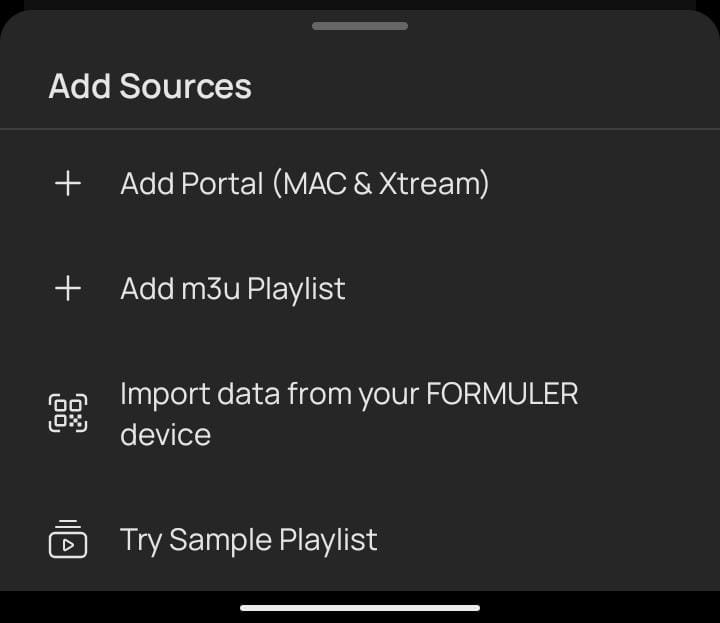
The Add Sources menu should display these options:
- Add Portal MAC and Xtream
- Add M3U Playlist
- Import Data from Your Formuler Device to a Simple Playlist
For the Lucid MAC-address activation procedure described here, select Add Portal MAC and Xtream
Step 4: Find Your Application MAC Address
After selecting Add Portal MAC and Xtream, the application will display a new configuration interface.
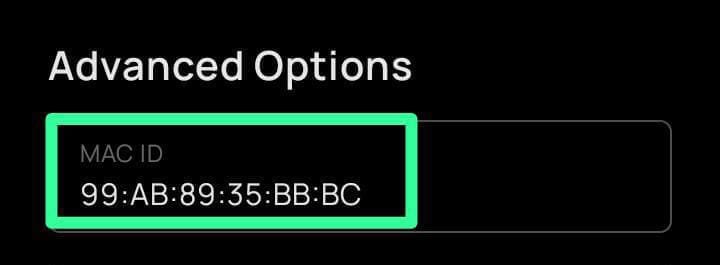
You may see a Login Required message and an ID field.
The ID is the MAC address used for this activation process.
To view it:
- Select Advanced.
- Locate the MAC address displayed by the application.
- Carefully copy the complete address.
An illustrative MAC address could look like this:
99:AB:89:35:BB:CC
This is only an example. It is not an actual Lucid activation address. Always use the address shown in your own application.
Step 5: Send Your MAC Address for Activation
Send the correct MyTVOnline+ application MAC address to your Lucid service provider.
The provider uses the supplied address to process your subscription activation through the service panel.
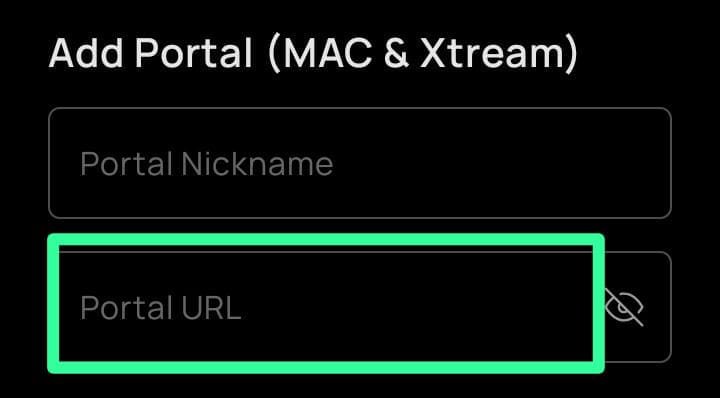
Once activation is completed, the provider supplies the Portal URL required for your connection.
Step 6: Enter the Portal URL
Return to the MyTVOnline+ configuration screen.
Find the field labelled Portal URL and enter the complete URL provided by your Lucid service provider.
Check the address carefully to avoid typing mistakes.
Lucid IPTV Subscription Plans: What Should You Check?
Before selecting a subscription, consider the features that matter most to your viewing requirements.
Lucid IPTV Panels provides flexible subscription options. When comparing plans, pay attention to:
- Subscription duration
- Number of simultaneous connections
- Available content categories
- Supported streaming quality
- Device and application compatibility
- Activation instructions
- Renewal terms
- Customer support availability
Choosing a plan based on your actual requirements can help you avoid paying for features or connections you do not need. https://lucidiptvpanels.com/pricing-plans/